Weights Studio Guide
Weights Studio is the visual frontend for WeightsLab experiments.
It ships inside the Python package — no Docker, no Envoy.
Running weightslab start serves the bundled SPA and proxies gRPC-Web to
your training backend, all from one Python process.
Architecture
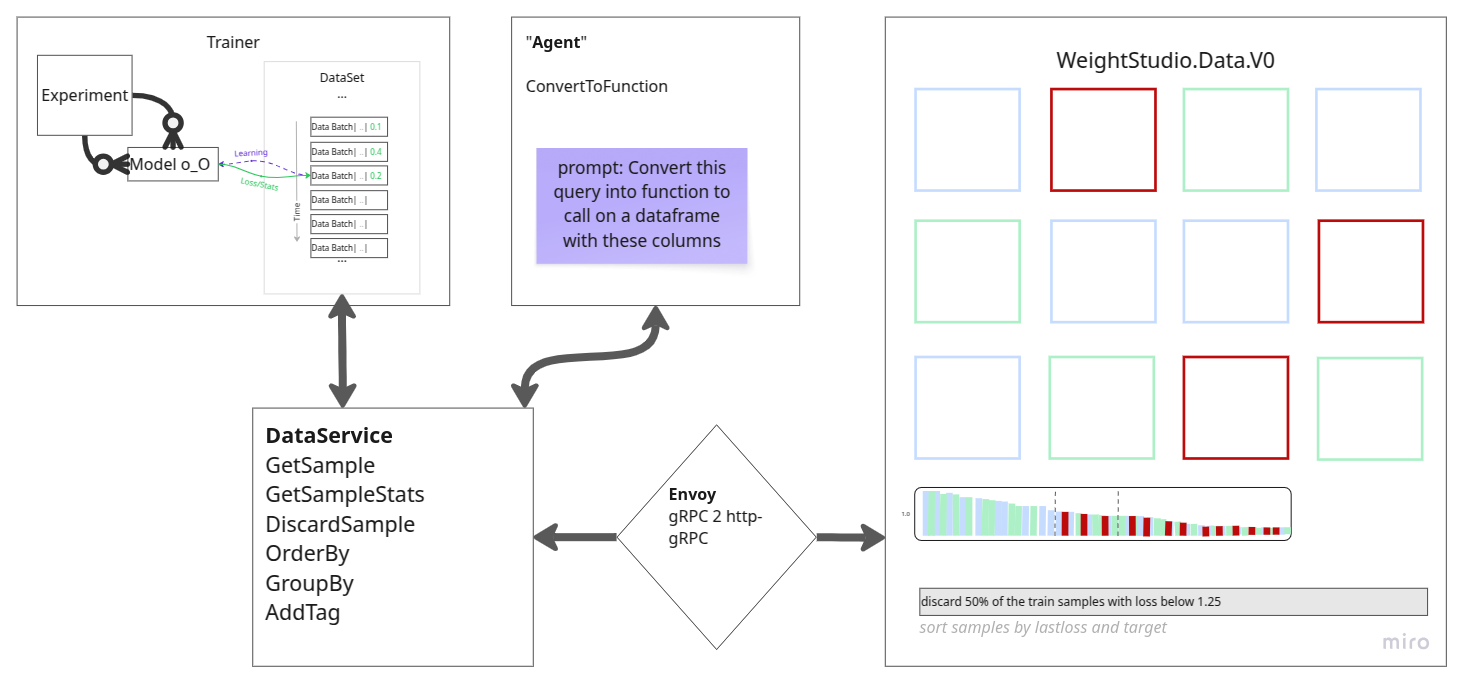
Runtime path:
Browser (served from
weightslab start)weightslab start— pure-Python HTTP server that:Serves the pre-built Weights Studio SPA (vendored in
weightslab/ui/static/)Translates gRPC-Web (browser) to raw gRPC (backend) via an embedded proxy
WeightsLab Python gRPC service (started by
wl.serve())
Quick start
Install WeightsLab:
pip install weightslab
In your training script, start the backend:
import weightslab as wl
wl.serve(serving_grpc=True)
# ... training loop ...
wl.keep_serving()
In another terminal, start the UI:
weightslab start
Open the URL printed by
weightslab startin your browser.
The UI auto-discovers the backend on localhost:50051 (default).
Pass --backend-port to override:
weightslab start --backend-port 50052
To suppress auto-opening the browser:
weightslab start --no-browser
Ports
UI HTTP server:
8080by default (--port PORTor$WEIGHTSLAB_UI_PORT)Backend gRPC:
50051by default (--backend-port PORTor$GRPC_BACKEND_PORT)
If port 8080 is already in use, weightslab start automatically finds the
next free port and logs the one it chose.
Secure mode (HTTPS + mTLS)
The default is plain HTTP (no cert files required, easiest for local dev). To enable HTTPS between the browser and the UI server, and mTLS between the UI server and the backend:
Generate TLS certificates once:
weightslab se
Certificates are placed in
~/.weightslab-certs(or$WEIGHTSLAB_CERTS_DIR). Follow the printed instructions to exportWEIGHTSLAB_CERTS_DIRglobally.Start the UI in secure mode:
weightslab start --certs
--certsreads$WEIGHTSLAB_CERTS_DIR(single source of truth) and:Serves HTTPS using
ui-server.crt/ui-server.keyPresents
ui-client.crt/ui-client.keyto the backend (mTLS)Expects the backend CA at
ca.crt
Configure the backend to require mTLS:
export GRPC_TLS_ENABLED=1
export GRPC_TLS_REQUIRE_CLIENT_AUTH=1
export WEIGHTSLAB_CERTS_DIR=~/.weightslab-certs
Certificate files (all in $WEIGHTSLAB_CERTS_DIR)
File |
Purpose |
|---|---|
|
CA certificate (trusted by all parties) |
|
UI server TLS cert (browser to server) |
|
UI client mTLS cert (server to backend) |
|
Backend gRPC TLS cert (loaded by backend) |
|
Optional token for gRPC metadata auth |
Regenerate certificates at any time with weightslab se --force-certs.
Configuration reference
Backend environment variables (set before starting wl.serve())
Variable |
Default |
Description |
|---|---|---|
|
|
Log level ( |
|
|
Host the backend gRPC server binds to |
|
|
Port the backend gRPC server listens on |
|
|
|
|
|
|
|
|
Directory containing cert/key files |
|
(unset) |
Optional metadata-token auth (on top of mTLS) |
|
|
Raise for large tensors / image batches |
|
|
|
UI server environment variables (set before weightslab start)
Variable |
Default |
Description |
|---|---|---|
|
|
Interface the UI server binds to |
|
|
HTTP port ( |
|
|
Backend gRPC host to proxy to |
|
|
Backend gRPC port to proxy to |
|
|
Certs dir (read when |
Frontend runtime feature toggles
These are injected as window.* globals when the UI is served.
Set them as environment variables before weightslab start.
Variable |
Default |
Effect when |
|---|---|---|
|
|
Remove plots board + Signals card |
|
|
Remove data grid + metadata/details panel |
|
Remove Hyperparameters section (read-only HPs) |
|
|
|
Remove agent chat bar |
|
|
Cap on metadata histogram bars |
|
|
Max bounding boxes per thumbnail (per overlay) |
|
|
Max bounding boxes per modal image (per overlay) |
Tunnel (remote backend)
If your backend is running remotely (e.g. a Colab notebook behind ngrok or
bore), forward it to a local port with:
weightslab tunnel bore.pub:12345
Then weightslab start on the same machine proxies to it as if local.
The tunnel is raw TCP — the backend must be plaintext (GRPC_TLS_ENABLED=0).
Agent Usage in Weights Studio
Weights Studio includes an agent bar and an expandable agent history window. The agent can run with either:
a local Ollama provider configured on the backend
a cloud OpenRouter provider configured at startup or initialized from the UI
Local Ollama workflow
If the backend is configured with provider: ollama and the Ollama server is
running, the agent is available immediately after backend startup.
Typical local setup:
Start Ollama.
Start WeightsLab (
wl.serve(serving_grpc=True)).Start Weights Studio (
weightslab start).Ask questions in the agent bar.
Cloud OpenRouter workflow
If the backend is not initialized with a cloud key yet, Weights Studio shows
the agent as unconfigured and the input placeholder instructs the user to type
/init.
/init flow:
Type
/initin the agent input.Choose manual API key entry or the OpenRouter OAuth flow.
Select a model from the available model list.
Confirm to initialize the runtime connection.
The default cloud model is ~google/gemini-flash-latest.
Available agent commands
/init— initialize OpenRouter from the UI/model— open the model chooser to switch the active OpenRouter model/reset— clear the current agent runtime connection and status
History behavior
Command entries such as
/init,/model, and/resetare shown on the user side of the history.Agent lifecycle events (connection setup, model changes, reset) are shown as separate log-style entries.
A pinned instruction line at the top summarizes the available commands.
Bundled examples
Run a bundled example in one command (installs its requirements automatically):
weightslab start example          # classification (default)
weightslab start example --seg    # segmentation
weightslab start example --det    # detection
weightslab start example --3d_det # 3D LiDAR point-cloud detection
In another terminal, start the UI:
weightslab start
See weightslab start example --help for all options.
Cloud deployment
Because the UI is a plain Python process, cloud deployment is straightforward:
Install WeightsLab on the server:
pip install weightslab
Run
weightslab seonce to generate certificates.Start the backend in your training process (
wl.serve(serving_grpc=True)).Start the UI process:
WEIGHTSLAB_UI_HOST=0.0.0.0 weightslab start --port 8080 --certs --no-browser
Put a reverse proxy (nginx / ALB / Caddy) in front of port
8080and expose only443publicly.
The UI and backend can run on different machines — set --backend-host and
--backend-port accordingly.
Example systemd unit
[Unit]
Description=Weights Studio UI
After=network.target

[Service]
EnvironmentFile=/etc/weightslab/env
ExecStart=/usr/local/bin/weightslab start --port 8080 --no-browser
Restart=on-failure
RestartSec=5

[Install]
WantedBy=multi-user.target
Building the frontend from source
The pre-built SPA is vendored into weightslab/ui/static/. To rebuild from
the weights_studio source repository and update the vendored copy:
  # from the weights_studio repo
  npm ci && npm run build

# from the weightslab repo
rm -rf weightslab/ui/static/*
cp -R ../weights_studio/dist/. weightslab/ui/static/
UI controls and actions
Top header controls
Dark mode toggle: switch light/dark theme.
Refresh button: manually refresh dynamic stats in visible grid.
Refresh config popover: data/plot auto-refresh, clear cache.
Training button (Resume/Pause): toggles
is_trainingvia backend.Mode selector:
trainmode /auditmode.
Left panel
Training card: training state pill, connection status, live metrics.
Tags card: tag chips, new tag input, painter toggle.
Details card: grid settings, segmentation overlays, metadata field toggles.
Grid interactions
Drag selection rectangle (multi-select).
Ctrlmulti-select support.Right-click context menu: manage tags, discard/restore samples.
The UI pauses training before data-modifying actions to keep edits safe.
Bottom bar
Batch slider for sample navigation.
Start/end batch index labels.
Total and active sample counters.
Image detail modal
Large image preview with previous/next navigation.
Zoom in/out/reset controls.
Metadata detail panel.
Volumetric support with Z-slice slider when applicable.
Signal plots
Per-signal cards include:
Reset zoom, CSV/JSON export, settings (curve color, smoothing, std band, markers).
Right-click: reset zoom, change curve color, load weights at step, hide/show curve, break by slices, copy/save chart image.
WeightsLab CLI console
The WeightsLab CLI console is a local developer REPL for inspecting and controlling a running experiment through the global ledger.
Transport: local TCP text commands with JSON responses.
How to start it
From your training script (recommended):
import weightslab as wl

wl.serve(serving_grpc=True, serving_cli=True)
wl.keep_serving()
Connect from a terminal:
weightslab cli              # auto-discover port
weightslab cli --port 60000 # or specify one
Console actions
Full reference: User Commands Reference. Quick summary:
Discovery/help:
help,status,dump,ledger_dump.Training control:
pause/resume.Registry inspection:
list_models,list_optimizers,list_loaders,plot_model [model_name].Sample-level operations:
list_uids,discard,undiscard,add_tag.Hyperparameters:
hp,set_hp.Evaluation:
evaluate,eval_status,cancel_eval.Audit mode:
audit [on|off].AI agent:
agent/query/ask— see AI Agent.Session control:
exit/quit,clear/cls.
Troubleshooting
Studio loads but no data: check backend gRPC is running on the expected port (
--backend-port) and that there is no firewall blocking the connection.Port conflict:
weightslab startauto-selects the next free port and logs it; or pass--port PORTto pick a specific one.No plot updates: check plot auto-refresh setting and backend logger data.
TLS errors with –certs: run
weightslab sefirst to generate certs, then exportWEIGHTSLAB_CERTS_DIR.Connection refused on remote backend: use
weightslab tunnelto forward the remote port locally.